
During a typical hiring cycle, recruiters spend more time handling resumes than they expect. A single role can attract dozens or even hundreds of applications, and most of them arrive in PDF format. On the surface, everything looks clean and readable, but the moment data needs to be reused inside ATS systems or shared documents, small issues begin to appear that slow down the entire workflow.
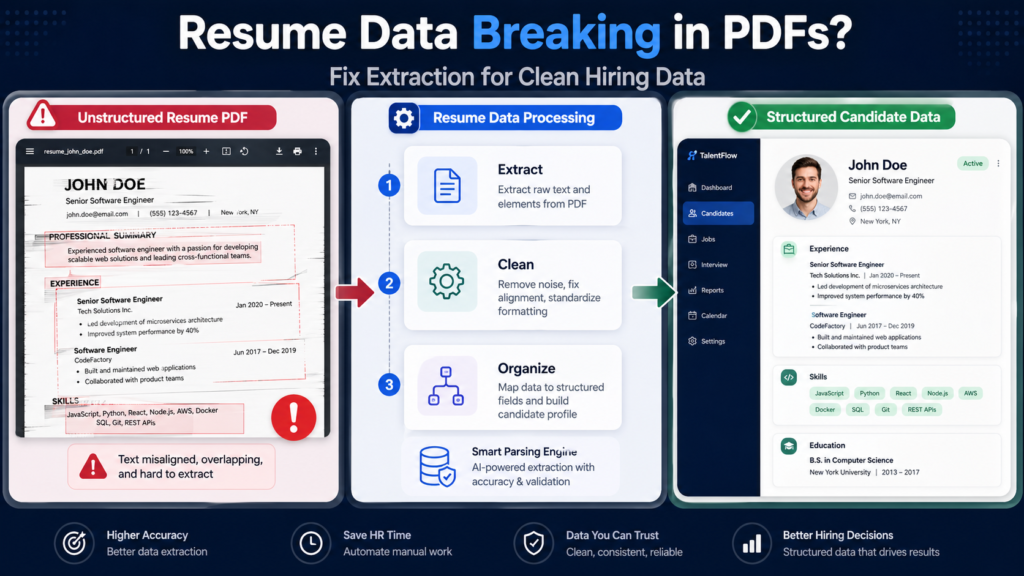
What you need to understand is this is not a small technical problem. It is a process gap. Resume handling is a core HR skill, and when it is not handled properly, it affects screening speed, data accuracy, and even candidate evaluation quality.
This guide focuses on practical skills that HR professionals actually use while working with resume PDFs, especially when extracting and structuring data for real hiring workflows.
Understanding How Resume PDFs Behave in Real Hiring Workflows
Most HR professionals assume that a PDF resume is just a static document, but the thing is that it behaves very differently when used in a workflow. A resume may look structured visually, but internally, the content is stored in a way that does not always translate well when copied or reused.
When resumes are moved between tools, such as ATS systems, spreadsheets, or shared documents, the formatting layer is lost. This is where names, experience details, and skills start appearing in the wrong places, which creates confusion during shortlisting.
The first skill is not extraction. The first skill is understanding how resume data behaves when it moves across systems.
Skill 1: Identifying Resume Type Before Taking Any Action
Before extracting any data, you should always identify the type of resume you are working with. This step is often skipped, but it directly affects the quality of output.
Digital resumes contain actual text and are easier to process. These are usually created using Word processors or online resume builders. Scanned resumes are image-based and require a different approach.
A quick check can save time. Try selecting a sentence or searching for a keyword. If it works properly, it is a digital file. If not, you are dealing with a scanned document and need a different method.
This simple habit prevents unnecessary trial and error.
Skill 2: Cleaning Extracted Data for ATS Compatibility
Extracted text is rarely ready for direct use. It often contains extra line breaks, inconsistent spacing, and broken sections that can affect how ATS systems read the data.
The cleaning step is where most of the real work happens. You should fix line breaks that interrupt sentences, normalize spacing between words, and rebuild paragraphs so that the content reads naturally.
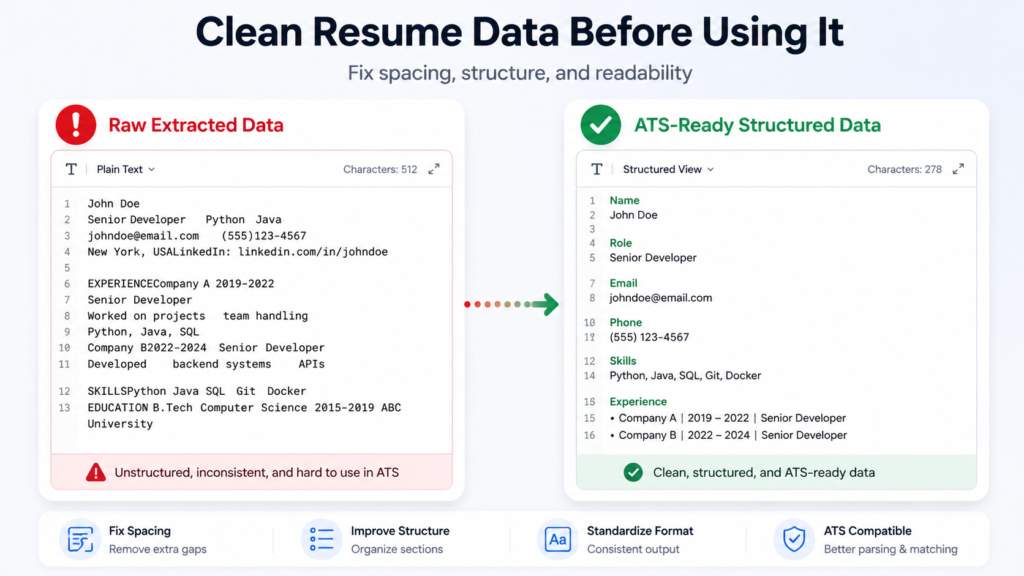
For teams that need to share or store formatted versions of resumes, it also helps to structure the cleaned content properly before final use. In such cases, many teams refer to workflows explained in this complete text to PDF formatting guide to maintain consistency when converting cleaned text back into structured documents.
Skill 3: Extracting Resume Content Without Breaking Structure
Copy paste is the most common approach, but it is also the most unreliable when dealing with structured resumes. When you copy content from a PDF, the system tries to rebuild text based on position, not meaning.
This is why experience lines break, bullet points shift, and skills merge together.
A better approach is to use a structured extraction method where you extract the text from the PDF in a way that preserves readability. This gives you a cleaner starting point, especially when dealing with multiple resumes.
Instead of fixing broken content later, you reduce the problem at the source.
Skill 4: Handling Scanned Resumes Using OCR in a Controlled Way
In many hiring scenarios, especially for field roles or bulk hiring, candidates upload scanned resumes. These files do not contain real text, which makes extraction impossible using normal methods.
OCR is used in such cases, but the key skill is not just using OCR. The key skill is controlling expectations and output quality.
You should always check:
- clarity of the document
- alignment of text
- presence of handwritten elements
- background noise in the scan
If the input is poor, the output will need correction. Skilled HR professionals do not assume accuracy. They validate extracted data before using it.
Skill 5: Separating Resume Sections for Better Evaluation
Resumes are not meant to be processed as a single block of text. They contain logical sections such as skills, work experience, education, and certifications.
When these sections are mixed together, it becomes difficult to compare candidates or filter profiles based on requirements.
A practical approach is to extract and organize each section separately. For example, list skills in one area, experience in another, and education in a structured format. This makes evaluation faster and reduces the chances of missing important details.
This is especially useful when multiple recruiters are working on the same role.
Skill 6: Building a Repeatable Resume Processing Workflow
Handling resumes manually without a defined process leads to inconsistency. One recruiter may clean data differently from another, which creates variation in how profiles are evaluated.
A simple workflow solves this problem.
The process usually includes:
- identifying file type
- extracting content
- cleaning formatting
- organizing sections
- feeding data into systems
Once this workflow is followed consistently, it reduces errors and improves speed across the team.
This is not about automation. This is about standardization.
Skill 7: Evaluating and Testing Tools Before Adopting Them
Many HR teams explore different tools to improve resume processing, but the selection process is often rushed. A tool that works well for one type of resume may not perform the same for another.
A better approach is to test tools based on actual use cases. Try them with different resume formats, check output quality, and evaluate how much manual cleanup is required.
In some teams, especially those working with limited budgets or training environments, there is also a phase where tools are tested before purchase decisions are made. During this stage, people sometimes explore options like gift cards and redeem codes including Google Play to access premium features temporarily and compare tools without immediate investment.
This approach allows teams to make informed decisions instead of relying on assumptions.
Common Mistakes That Slow Down Resume Processing
Even experienced professionals make small mistakes that affect efficiency. Some of the most common ones include:
- skipping file type identification
- relying only on copy paste
- ignoring cleanup before system entry
- using the same method for all resume formats
Avoiding these mistakes improves both speed and accuracy.
When to Automate Resume Processing and When to Keep It Manual
Automation can help when dealing with large volumes of resumes, but it is not always necessary. For smaller hiring needs, manual processing can still be effective if done correctly.
The decision depends on the volume of applications, the complexity of roles, and the tools available to the team.
The key is to choose the method that balances speed and accuracy.
FAQs
Why Does Resume Data Break When Copied From PDFs?
Resume data breaks because PDFs store content based on layout positioning instead of text flow. When copied, the system tries to reconstruct the content, which often leads to broken formatting.
Can All Resume PDFs Be Converted Into Editable Text?
Most resumes can be converted, but the method depends on the type of file. Digital resumes allow direct extraction, while scanned resumes require OCR.
What Is The Most Efficient Way To Process Multiple Resumes?
The most efficient way is to follow a repeatable workflow that includes identifying file type, extracting content, cleaning formatting, and organizing sections before use.
Do HR Teams Always Need Tools For Resume Processing?
Tools are helpful when dealing with complex layouts or large volumes, but simple resumes can still be handled manually if the workflow is clear.
Final Thoughts
Resume processing is a daily task in recruitment, but it is often treated as a basic step instead of a skill. When handled properly, it improves efficiency, reduces errors, and makes hiring decisions more consistent.
The thing is that small improvements in this process can save hours of work over time. Once the right approach is followed, handling resume PDFs becomes a structured and predictable part of the hiring workflow instead of a repetitive challenge.